
FULL PARTITURAS EDITOR
Free online sheet music editor
Write sheet music in your browser, listen to it with instrument sounds and download it as PDF, MIDI or MusicXML. No software to install and no account needed.
- Free
- No sign-up
- No download
- 7 languages
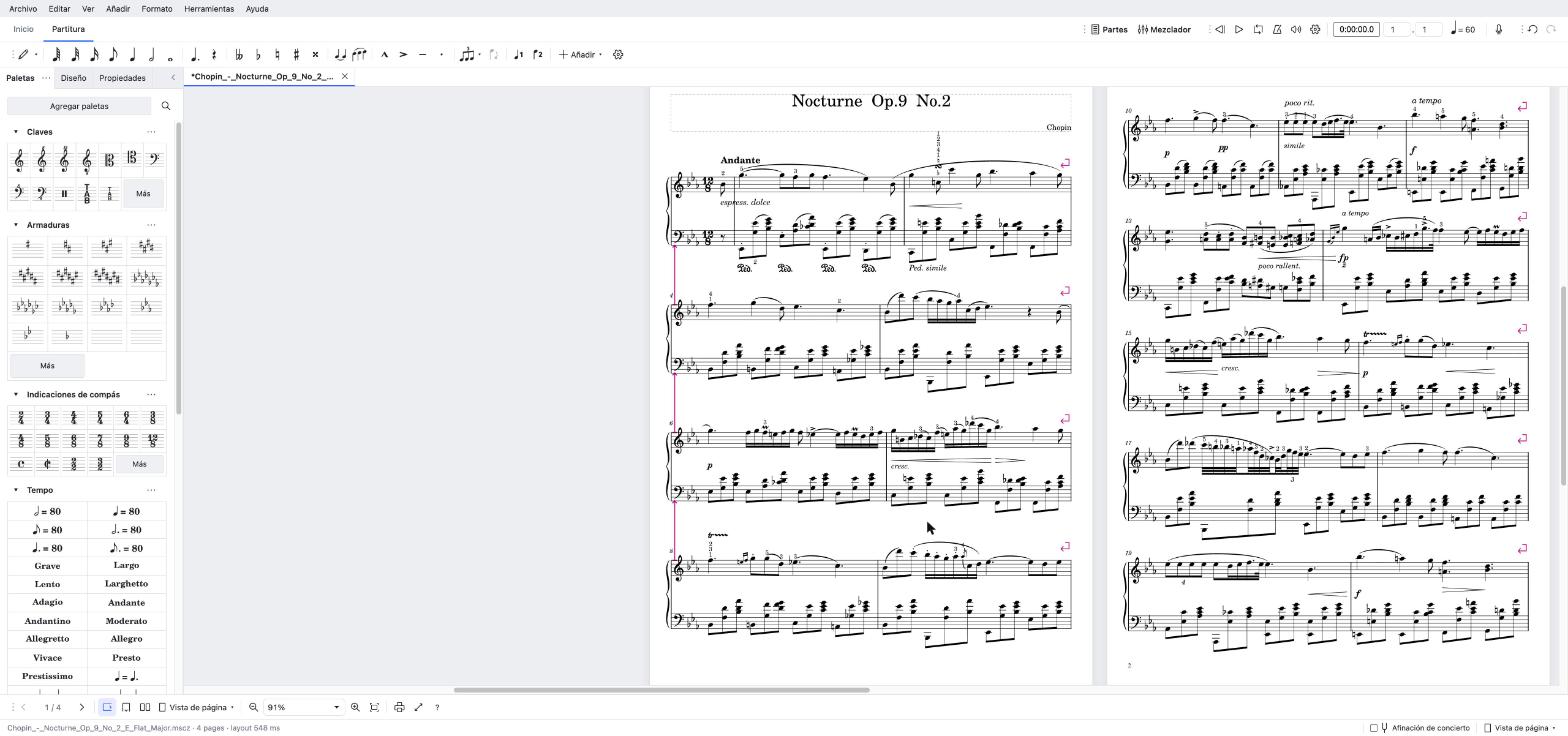
Write sheet music
Start from a template or pick your instruments, then enter notes with the mouse, the computer keyboard, a MIDI keyboard or the microphone.
Start writingPlay back and transpose
Listen to the score with instrument sounds, balance the parts in the mixer and transpose it to any key for your instrument or voice.
Open the editorView a score
Open a MuseScore, MusicXML or MIDI file to read it like a sheet of paper and listen to it, without changing it.
Open the viewerHow to write sheet music online
Creating and editing sheet music online here works much like desktop notation software:
- Create the scoreOpen the editor and click “New”. Choose a template (piano, choir, guitar, band…) or add instruments, then set the title, key, time signature and tempo.
- Enter the notesPress N for note input, choose a duration in the note bar and type the letters A–G or click on the staff. You can also play a MIDI keyboard or an instrument near the microphone.
- Add the detailsUse the palettes to add dynamics, articulations, slurs, chord symbols, lyrics and repeats.
- Listen and exportPlay it back, transpose it if needed (Tools › Transpose) and export a PDF to print, or MIDI and MusicXML for other programs.
Everything you need to edit sheet music online
Templates and instruments
MuseScore’s templates and instrument list: piano, strings, winds, percussion, choir, guitar and bass.
Playback and mixer
Hear every staff with its own sound, change volumes and mute instruments to practise your part.
Transposition
Change the key of the whole score or a selection and switch between concert and transposed pitch.
Parts
Create each player’s part from the full score.
Chords, lyrics and tablature
Chord symbols, lyrics under the notes, fretboard diagrams and tablature for guitar and bass.
Play along
Playalong mode follows what you play into the microphone or on a MIDI keyboard and turns pages early.
Supported formats
Open
MuseScore (.mscz, .mscx), MusicXML (.musicxml, .mxl), MIDI, Guitar Pro, Power Tab and Capella.
Export
PDF, PNG, SVG, MIDI, MusicXML and MuseScore (.mscz).
Your scores are kept in this browser. Export a .mscz or MusicXML file to keep a copy or continue on another device.
Frequently asked questions
Is the sheet music editor free?
Yes. You can write, play back, transpose and export sheet music without paying and without an account.
Do I need to install anything?
No. It runs in recent versions of Chrome, Edge, Firefox and Safari. The first visit downloads the music fonts and the sound bank; after that it opens faster.
Where are my scores saved?
In your browser’s storage, on your device: they are not uploaded to our server. Clearing the browser data deletes them, so export a .mscz or MusicXML copy of the ones that matter.
Can I open MuseScore, MusicXML or MIDI files?
Yes: MuseScore 2, 3 and 4 (.mscz and .mscx), MusicXML, MIDI, Guitar Pro, Power Tab and Capella. Older MuseScore scores are converted when opened, like in the desktop app.
How do I transpose sheet music online?
Open the score, select all or part of it and use Tools › Transpose. Pick the target key or an interval, then export the result as PDF, MIDI or MusicXML.
Does it work on a phone?
It opens on phones and tablets, but writing music is much easier on a computer with a keyboard and mouse. To read and listen to a score on your phone, use the viewer.
Is this MuseScore?
No. It is based on MuseEncore, an independent open-source project that brings MuseScore Studio’s engraving engine to the browser. It is not an official MuseScore product and is not endorsed by MuseScore Limited.
More from Full Partituras
Looking for something to play? Find thousands of free sheet music scores on Full Partituras. Turn a recording into sheet music with Transcribe, practise on the online piano, split instruments with Play or train your ear with Ear. See all tools.